
Isometric Graph Paper vs. Triangle Dot Grid: Which One Should You Use?
Isometric line grids and triangle dot grids share the same underlying geometry but look and behave very differently on the page. Compare both formats and learn when each one fits your project.
Tip: If you're not sure which to choose, start with a triangle dot grid for general sketching and switch to a full isometric line grid only when a specific drawing needs precise, repeated alignment along all three axes.
The core difference: full lines vs vertex dots
Isometric graph paper and triangle dot grid paper are built from the same underlying geometry: three line directions 60° apart, forming a lattice of equilateral triangles. Where they differ is how much of that lattice actually gets drawn on the page.
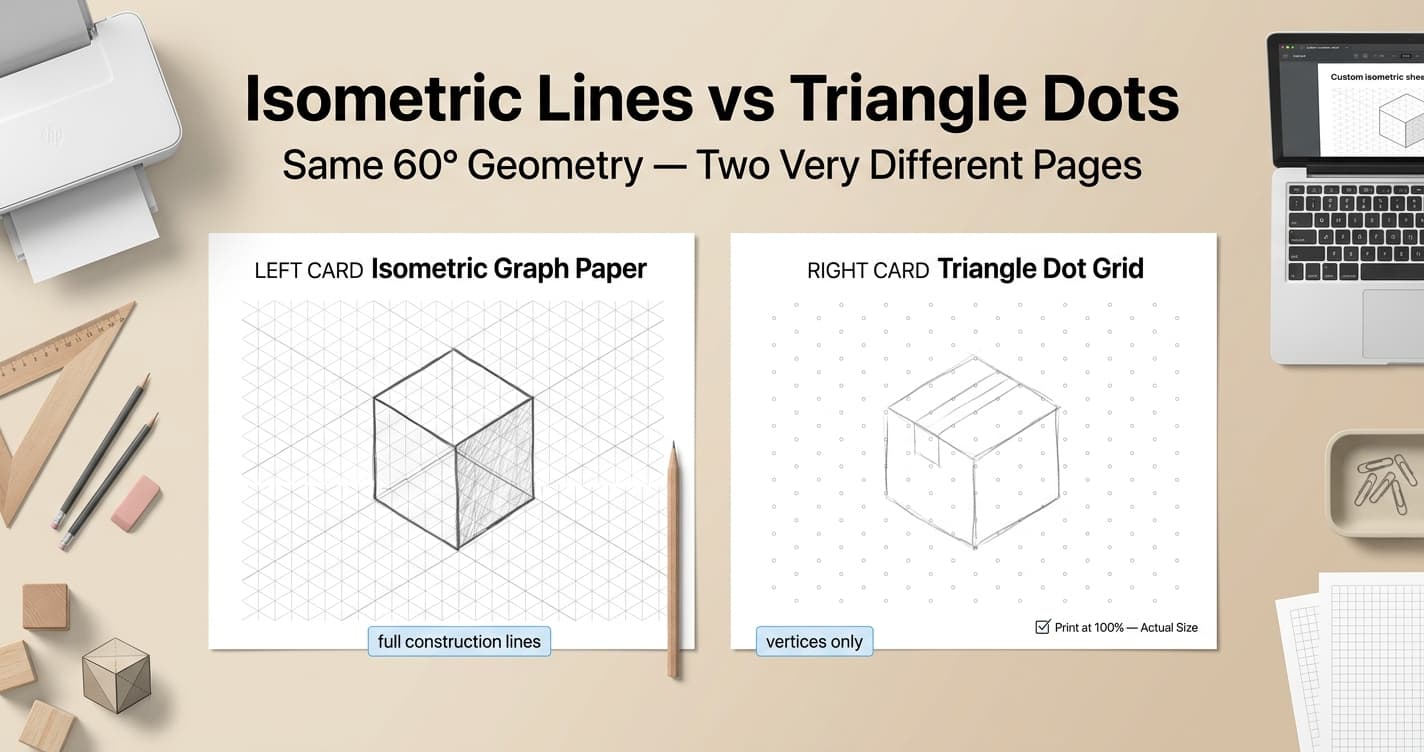
Isometric graph (line) paper draws all three sets of parallel lines in full: a vertical set plus two diagonals at ±30° from horizontal. Every edge of every equilateral triangle is a visible line you can trace or measure along directly. The page reads as a continuous grid, similar in density to square graph paper but arranged for three-axis drawing.
Triangle dot grid paper, often called isometric dot paper, keeps only the vertices: small round dots mark each point where three lines would otherwise meet, arranged in offset rows so every group of three neighboring dots forms an equilateral triangle. This produces a hexagonal arrangement of points with open space between them rather than a solid grid.
Why the difference matters for your drawing
A full line grid gives you a constant visual reference for all three isometric axes. Because the lines are already on the page, you can trace directly along them or snap freehand strokes to the nearest guide, which is valuable when precision matters more than a clean final appearance, such as in a construction sketch you plan to ink over.
A dot grid is deliberately quieter. It marks position without dictating direction, so the page stays visually open for freehand lines, lettering, or shading that doesn't need to follow a fixed 60° path. That openness is exactly why triangle/isometric dot grids are popular in bullet journaling and light sketching, where a busy line grid would compete with handwriting and decorative elements.
In practice, the choice comes down to how much of the final page you want the grid itself to occupy: a full presence that guides every stroke, or a light scaffold that disappears once you've used it to place your first few reference points.
When to use a full isometric line grid
Reach for a full isometric line grid when you need to draw along all three axes repeatedly and accurately: architectural massing studies, mechanical and technical illustration, exploded assembly diagrams, and isometric game or pixel art where tile edges must align precisely from one drawing to the next.
It also suits product design mockups and packaging sketches, where boxes, panels, and folds need to stay proportional along every edge as you rough out a 3D concept by hand before moving to CAD software.
When to use a triangle dot grid
Choose a triangle dot grid for bullet journaling and creative spreads where you want an occasional isometric reference without a permanent line grid dominating every page. The dots are enough to keep a small 3D doodle or icon proportional, then disappear visually once you move on to plain text.
Quilters and fabric designers also use triangle dot grids for hexagon and diamond tessellation planning, since the triangular spacing corresponds directly to common quilt block geometry without the visual clutter of full connecting lines.
If your sketching is mostly organic or exploratory, with only occasional need for a true isometric angle, a dot grid gives you that reference without committing the entire page to a rigid line pattern.
Printing tips for both grid types
Both formats depend on exact spacing to keep their triangles equilateral, so always print at Actual Size or 100% scale and disable any Fit to Page or Shrink to Fit option. Even a small scaling change shifts the ratio between the three axes and makes triangles look subtly skewed.
Choose your paper size before setting spacing, since A4 (210×297mm, or 8.27×11.69 inches) and US Letter (8.5×11 inches, or 216×279mm) have different printable areas. One inch equals 25.4mm, so spacing values set in millimeters and inches should convert cleanly as long as the generator and printer agree on the same paper size.
For long print runs, a light gray line or dot color keeps either grid visible without using excess ink. Use a thin line weight (about 0.1–0.2mm) on isometric line grids, and a small dot diameter on triangle dot grids, so the reference stays subtle enough to draw or write over cleanly.
Generate isometric graph paper or a triangle dot grid
Open the isometric line-grid tool for full 60° construction lines, or use the related triangle/isometric dot tool for vertex-only guides — set spacing and export PDF, PNG, or SVG.
Open Isometric Graph Paper Tool