
A4 vs Letter Paper Size: Which One to Use for Printable Grids?
A4 is taller and narrower; US Letter is shorter and wider. Pick the size your printer actually uses, then generate graph paper and dot grids to that page so squares stay square.
Tip: Always use the same paper size (A4 or Letter) across your generator, PDF export, and printer settings to avoid scaling issues.
A4 vs Letter: quick comparison
A4 and US Letter are the two most commonly used paper sizes for printable documents, including graph paper and dot grids. They are close enough that a stack of mixed sheets can look the same in a drawer, and different enough that a grid generated for one size will not sit correctly on the other. The choice is not aesthetic. It is a match between the page box in your PDF, the paper in the tray, and the printable area your printer actually marks.
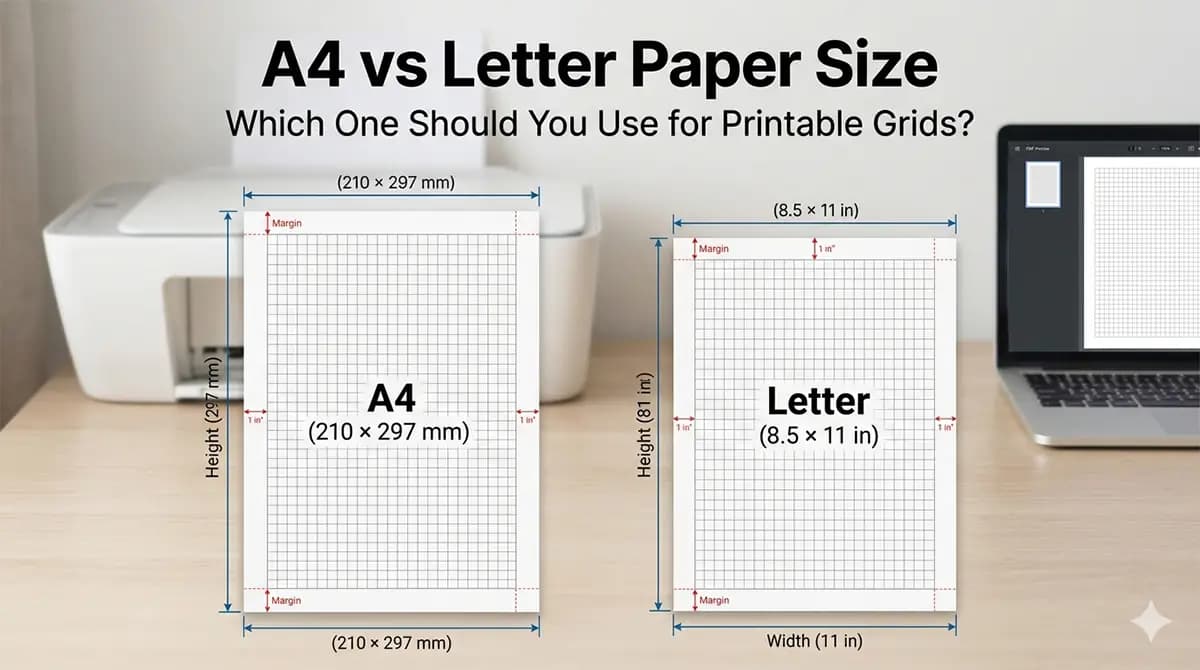
A4 is slightly taller and narrower, while Letter is shorter and wider. On a square grid, extra width on Letter means more columns if you fill the sheet; extra height on A4 means more rows. If the file and the paper disagree, the driver usually scales the page to fit. Squares often stay square but print smaller than the spacing you set; leftover space appears on one side. Fill or stretch settings are less common and are what turn squares into rectangles.
Choosing the correct paper size before generating your printable grid is essential for accurate results. Set A4 or Letter in the generator first, export a PDF that uses that page size, then print on matching stock at 100% scale. Changing the paper size after you have already designed a layout is possible, but it changes how many cells fit and where the outer lines fall relative to hole punches and printer margins.
Exact dimension differences
A4 measures 210 x 297 mm (8.27 x 11.69 inches), while US Letter measures 8.5 x 11 inches (216 x 279 mm). Converted the other way, Letter is 215.9 x 279.4 mm. A4 is about 18 mm taller and about 6 mm narrower than Letter. That is a little more than three 5 mm grid squares in height and a little more than one 5 mm square in width.
The difference in height and width changes how much printable area you have, especially when working with grids or structured layouts. Desktop printers also keep a non-printable border, often around 5 mm and sometimes more on the trailing edge. After that inset, an A4 sheet might offer roughly 200 x 285 mm of usable grid, while Letter offers roughly 206 x 269 mm. Exact numbers depend on the machine; the point is that Letter is still wider and A4 is still taller once margins are removed.
Even small mismatches between these formats can lead to clipped edges or uneven spacing when printing. A 5 mm square grid that fills A4 with a 5 mm margin on each side fits 40 columns and 57 rows inside the sheet (200 mm / 5 mm and 285 mm / 5 mm on a typical usable area). The same 5 mm module on Letter with the same margin idea yields about 41 columns and 53 rows. You cannot drop an A4 chart onto Letter and keep both the module size and the outer frame.
Dot grids and lined paper follow the same arithmetic. A 5 mm dot spacing that was centered on A4 will sit closer to the left and right edges on Letter and run short of the top and bottom. Coordinate axes that were placed in the geometric center of A4 are not in the center of Letter. Generate the page for the sheet you will load, rather than stretching a finished PDF.
When to use A4 paper
Use A4 if you are in Europe, Asia, or most regions where A-series paper is the standard format. ISO 216 A-series is the default in shops, copiers, and office trays across much of the world. If your printer’s paper-size list highlights A4, and the ream in the cupboard is labeled 210 x 297 mm, generate grids as A4.
Most office printers outside North America default to A4, making it the safest choice for international use. A file you email to a collaborator in Germany or Japan is more likely to print without a scaling prompt if the PDF page box is already A4. Mixed teams should pick one size for shared templates and say so in the filename, for example graph-5mm-a4.pdf, so nobody opens Letter stock by habit.
A4 is a practical default for printable planners, graph paper, and templates shared outside North America. It also tiles cleanly with other A-series sizes: two A5 sheets make A4, two A4 sheets make A3. If you later need a poster-size grid, starting on A4 keeps the module compatible when you move up a size. If the paper in the tray is Letter, generate Letter. Matching the stock matters more than matching a regional default.
When to use Letter paper
Use US Letter if you are in the United States or Canada, where this format is standard for printers, binders, and documents. Letter-size binders, page protectors, and manila folders are built around 8.5 x 11 inches. An A4 sheet is taller than those sleeves and often has to be folded or will stick out of a folder.
Most course packs, office templates, and copier defaults in North America assume Letter. A PDF that declares A4 may still print, but the driver will often fit it to Letter, shrinking the page and distorting grid spacing. If your readers will print at home in the US or Canada, Letter is the size that matches the tray they already use.
Choosing Letter ensures compatibility with local printing workflows and avoids unexpected scaling. If you travel with a laptop full of A4 templates and then buy a ream of Letter at a US drugstore, regenerate the grids rather than printing the old files. The extra width on Letter is useful for notebooks with a punched margin: you can keep a 5 mm module and still clear a 25–32 mm left margin for holes.
How paper size affects printing
If you design a grid for A4 but print it on Letter (or vice versa), the printer may scale the document. Most consumer drivers scale uniformly to fit, so squares stay square while a 5 mm module might print near 4.7 mm, with leftover margin on the unused side. That still throws off drawings, sewing layouts, and handwriting baselines across a full sheet, because the printed spacing no longer matches the generator. A setting labeled Actual Size can still scale when the PDF page size and the tray size disagree; confirm both.
Independent stretch—mapping 210 mm onto about 216 mm and 297 mm onto 279 mm—is less common, but it is what turns squares into rectangles. Dot grids and isometric lines fail the same way; the error is harder to see until you try to draw a true square or an equilateral triangle.
Match generator settings, PDF page size, and printer paper size. Check the page size in the PDF viewer, then set the driver to the same size at 100% / Actual Size with Fit to Page off. Step-by-step printer dialogs, PNG versus PDF, and clipped-margin fixes belong in the home printing guide. This page is about choosing the sheet so those settings have a correct page to honor.
Common mistakes to avoid
Fit to Page rescales the grid automatically. The print preview can look tidy while every square is slightly wrong. Turn scaling off and accept a small unprinted border rather than a changed module.
Do not export a PDF in one format and print it on another. An A4 PDF sent to a Letter tray is the usual case. Confirm both the document page size and the paper source. If they differ, export again for the paper you have.
Printer margin limits clip outer grid lines. Full-bleed grids look complete on screen and lose the last row or column on paper. Keep a margin that clears the non-printable area, then fill the remaining rectangle with cells.
Print a sample page before a full run. One sheet and a ruler answer the size question: ten 5 mm gaps should measure 50 mm. If they do not, stop and fix page size or scale before you print a stack or a bound notebook.
ISO A-series, ANSI Letter, and binding
A4 belongs to ISO 216. Each A size is half the area of the next larger one, with the same aspect ratio. Letter belongs to the ANSI series used in North America; it does not halve cleanly into a matching smaller sheet the way A4 halves into A5. If you produce a family of grids (full page, half page, pocket), A-series makes the math tidy. If the sheets must drop into US three-ring binders, Letter wins even if the rest of your catalog is A4.
Binding and hole punches eat the same physical edge on both sizes, but they interact with the different widths. A standard US three-hole punch sits on Letter. European two- or four-hole punches sit on A4. If you generate a grid with a 10 mm left margin and then punch it, the first column may disappear. Plan the margin for the punch you will use: often 25 mm on Letter for a binder, and a similar allowance on A4 if the sheets will be filed rather than stacked.
When in doubt, look at the paper you will load, set that size in the generator, and print a single test. The right choice is the sheet that comes out without scaling, with squares that still measure as squares.
Generate graph paper in the correct size
Choose A4 or Letter, adjust spacing, and export print-ready grid PDFs.
Open Graph Paper Tool